# Setting Up In App Notifications

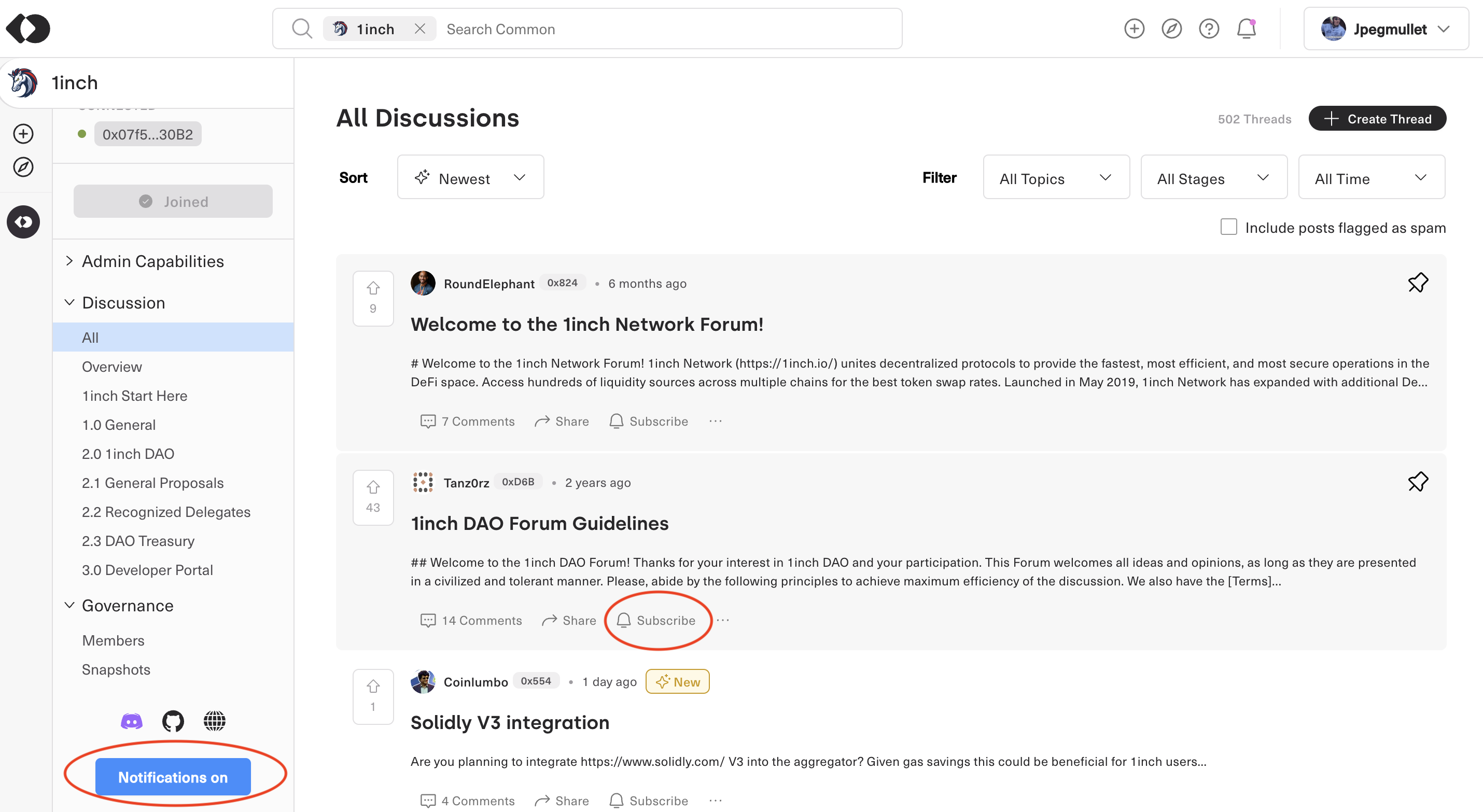
In each community, there is a button to turn on notifications on the bottom of the **Side Navigation.**

Users also have the ability to subscribe to individual threads by clicking the subscribe button on the thread&#x20;

<figure><img src="https://4038278619-files.gitbook.io/~/files/v0/b/gitbook-x-prod.appspot.com/o/spaces%2F-MS4HVJBYMMGS10H8bJU%2Fuploads%2F9vynVCwhbpJIZdmgjSpp%2FScreenshot%202023-10-19%20at%201.14.46%E2%80%AFPM.png?alt=media&#x26;token=74bf0222-ed9a-4405-b7e3-5efdefc3c25d" alt=""><figcaption><p><strong>(Highlighted in red in the screenshot above are the notifications tabs)</strong></p></figcaption></figure>

Users can also toggle their notifications setting by clicking the drop down of their account&#x20;

<figure><img src="https://4038278619-files.gitbook.io/~/files/v0/b/gitbook-x-prod.appspot.com/o/spaces%2F-MS4HVJBYMMGS10H8bJU%2Fuploads%2FSzbpoaNpjxORvgLKtUMV%2FScreenshot%202023-10-19%20at%201.24.08%E2%80%AFPM.png?alt=media&#x26;token=2422926b-8bf9-44a1-abd7-a4b8daf25f93" alt=""><figcaption></figcaption></figure>

Clicking into the notifications tab and then toggling on Push Notifications &#x20;

<figure><img src="https://4038278619-files.gitbook.io/~/files/v0/b/gitbook-x-prod.appspot.com/o/spaces%2F-MS4HVJBYMMGS10H8bJU%2Fuploads%2FThxg48A7KwmDrMqISI3z%2FScreenshot%202025-02-07%20at%203.46.27%E2%80%AFPM.png?alt=media&#x26;token=353c06e0-64b5-4795-8f44-1011af4b864f" alt=""><figcaption></figcaption></figure>

**Select what Communities you would like alerts for**
<figure><img src="https://4038278619-files.gitbook.io/~/files/v0/b/gitbook-x-prod.appspot.com/o/spaces%2F-MS4HVJBYMMGS10H8bJU%2Fuploads%2FBvq7S0Lznt3AKzeumQ20%2FScreenshot%202025-02-07%20at%203.47.06%E2%80%AFPM.png?alt=media&#x26;token=eb8ef8db-81f0-40e0-b512-afd8bbb103a7" alt=""><figcaption></figcaption></figure>
